Programming Examples
Arduino program to interface a PIR (Passive Infrared) sensor
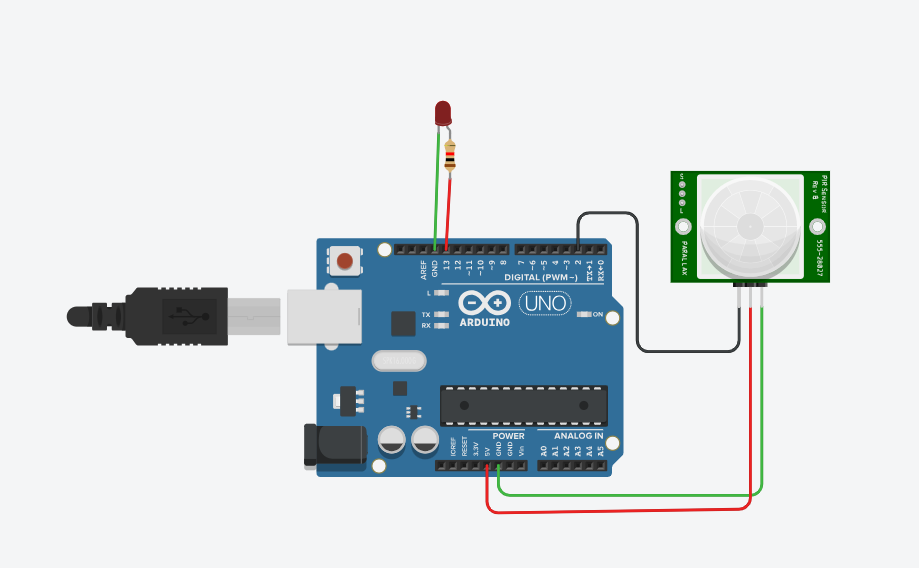
Arduino to interface a PIR (Passive Infrared) sensor . A PIR sensor detects motion by measuring changes in infrared levels emitted by surrounding objects.
Components Needed:
- Arduino board (e.g., Uno)
- PIR sensor module
- Breadboard and jumper wires
Circuit Connection:
- Connect the VCC pin of the PIR sensor to the 5V pin of the Arduino.
- Connect the GND pin of the PIR sensor to the GND pin of the Arduino.
- Connect the OUT pin of the PIR sensor to digital pin 2 of the Arduino.
Solutionvoid setup() {
Serial.begin(9600);
pinMode(2, INPUT);
pinMode(13, OUTPUT);
}
void loop() {
int sensorValue = digitalRead(2);
Serial.println(sensorValue);
if (sensorValue == HIGH) {
digitalWrite(13, HIGH);
} else {
digitalWrite(13, LOW);
}
delay(100);
}
Output/ Explanation: pinMode(pirSensorPin, INPUT);: Configures the pin connected to the PIR sensor as an input.
digitalRead(pirSensorPin);: Reads the value from the PIR sensor. It returns HIGH if motion is detected and LOW if no motion is detected.
Serial.println(sensorValue);: Prints the sensor value to the Serial Monitor.
digitalWrite(ledPin, HIGH);: Turns on the built-in LED when motion is detected.
digitalWrite(ledPin, LOW);: Turns off the built-in LED when no motion is detected.