Programming Examples
Write a program to interface a button and an RGB LED with the Arduino. On each button press, the RGB LED should change its color in the sequence: Red, Green, Blue.
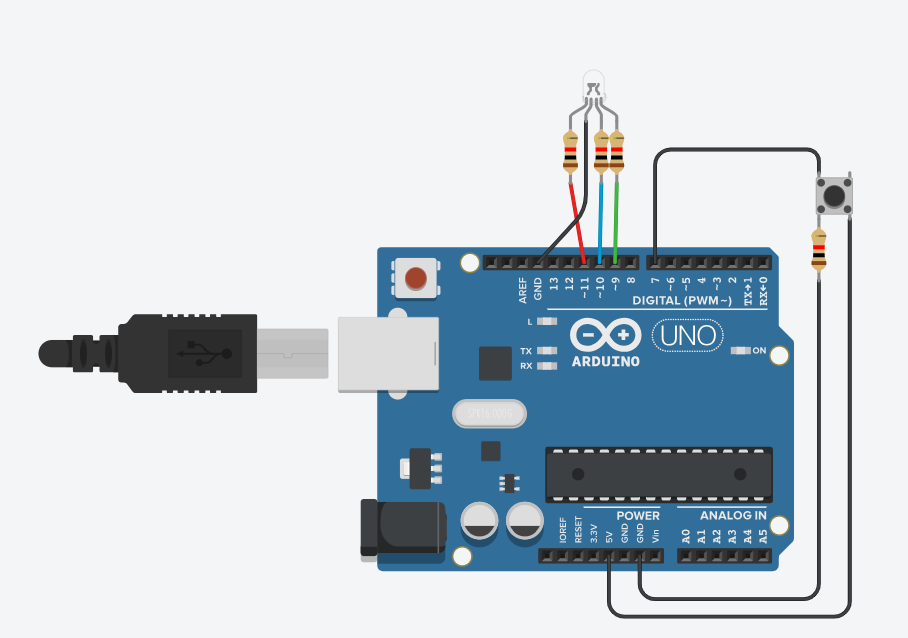
Write a program to interface a button and an RGB LED with the Arduino. On each button press, the RGB LED should change its color in the
sequence: Red, Green, Blue.
Solution#define BUTTON_PIN 7
#define RED_PIN 11
#define GREEN_PIN 9
#define BLUE_PIN 10
int colorState = 0;
int lastButtonState = HIGH;
void setup() {
pinMode(BUTTON_PIN, INPUT_PULLUP); // Button with internal pull-up
pinMode(RED_PIN, OUTPUT);
pinMode(GREEN_PIN, OUTPUT);
pinMode(BLUE_PIN, OUTPUT);
}
void loop() {
int buttonState = digitalRead(BUTTON_PIN);
// Detect button press (HIGH to LOW transition)
if (buttonState == LOW && lastButtonState == HIGH) {
colorState = (colorState + 1) % 3; // Cycle through 0,1,2
setColor(colorState);
delay(200); // Simple debounce
}
lastButtonState = buttonState;
}
void setColor(int state) {
// Turn OFF all colors first
digitalWrite(RED_PIN, LOW);
digitalWrite(GREEN_PIN, LOW);
digitalWrite(BLUE_PIN, LOW);
if (state == 0) {
digitalWrite(RED_PIN, HIGH); // Red
} else if (state == 1) {
digitalWrite(GREEN_PIN, HIGH); // Green
} else if (state == 2) {
digitalWrite(BLUE_PIN, HIGH); // Blue
}
}
Output/ Explanation: